Control what your child watches on YouTube
You say what is allowed, and every video is checked against that before your child sees it. Lantern reads and watches the video itself. Anything it catches comes off your child's page.
Your first day is free and we do not ask for a card to start. Pick your child's age and their wall is ready in about a minute. After the free day the wall pauses until you add a card. Ask inside 30 days of the first charge and we refund the full amount.
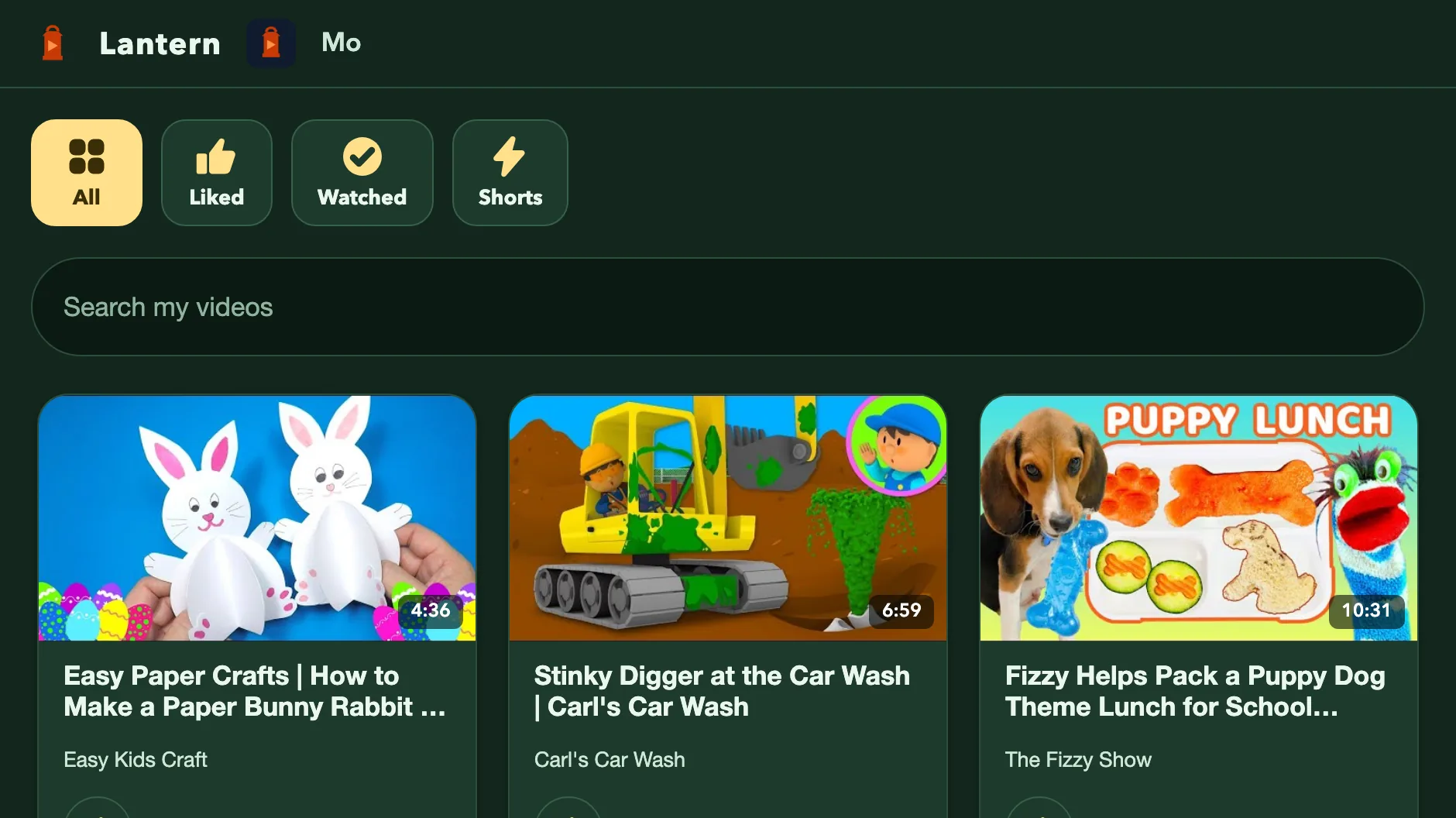
Each child gets a page of videos that fit the limits you set.
The problem
Right now YouTube decides, not you
YouTube picks what plays next. The controls you get are a kids mode, a time limit and an off switch. None of them let you say what actually worries you about a video, and none tell you why something got through.
The answer
What Lantern does
Every video is reviewed before your child sees it. The first AI agent looks at the title, the channel and how the video describes itself. A second agent then watches the video itself: the pictures and the sound, not the packaging. The agents are judges and their whole job is to watch rather than skim. They start with the videos already on your child's page. The moment they disagree, the video comes off every page it is on, and you are told why.
What the agents find becomes 14 scores: how scary a video feels, how loud and busy it is, how hard it is selling something, and eleven more. You set how much of each you will allow, via simple explanations or directly adjusting dials. One score over your line and the video does not reach your child.
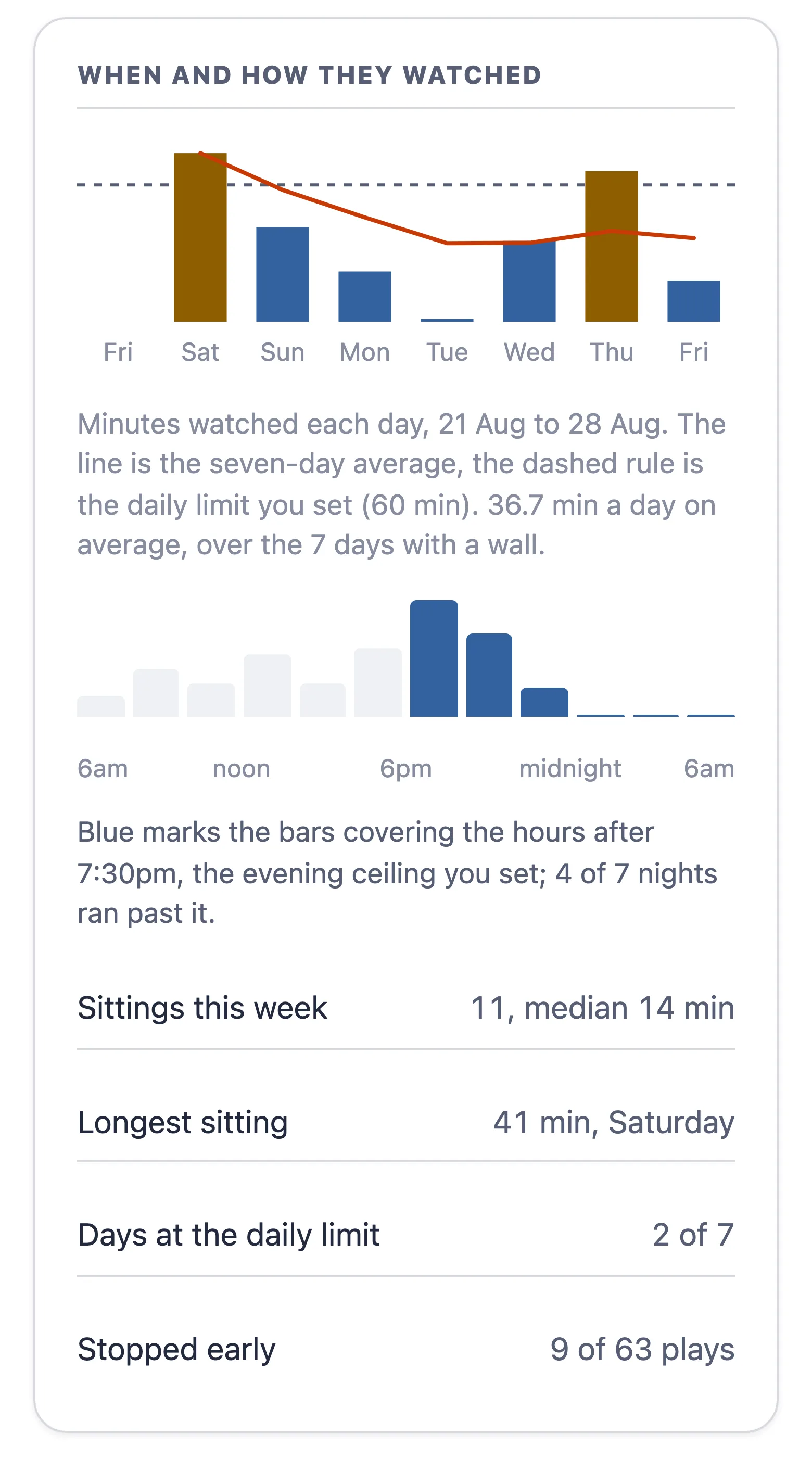
Each week a report card shows what your child watched and what was turned away. It names which of your limits turned it away, and one thing you could change. Your limits, your channel list and the videos waiting for your call all live on one page.
What about allowing only the channels I pick?
No. Lantern has no setting that narrows your child's page to a chosen list of channels. Here is what you can do instead. You can block any channel and it stops reaching your child. You can mark a channel you trust, and Lantern pulls in more of it, still reading every video.
A channel list is one decision, made once. One bad video on a good channel gets in with it, and nobody is watching for it. Lantern judges the video, so the moment a bad one is caught it comes off every page it is on. The longer answer is on the questions page.
YouTube plays the videos, so YouTube can still show an ad in its own player. We sell none, we run no recommendations, and nothing autoplays into the next thing.
What you get
A report card: minutes each day, when they watch, and whether the wall kept your limits.
See a real wall first
It is the same page a child gets. No account, no email, no card, no form to get through first.
Try the demo wallQuestions parents ask
How much does Lantern cost?
Your first day is free. After it, $7.99 a month or $79 a year for the first 250 families, then $9.99 a month or $99 a year, for up to four children, and the walls are built for ages two to fifteen. Without a card, the wall pauses after the free day and comes back the moment you add one. A founding family keeps that price for as long as its subscription runs without a break. Cancel at any time and the time you already paid for runs to its end; a full refund is yours on request within 30 days of the first charge. It pays for the machines that watch every video and for the support queue. The whole of it is on the pricing page.
Can I allow only certain YouTube channels?
No, and the band above says what you get instead. The questions page gives the whole answer.
When can my child start watching?
As soon as setup ends. A new family starts from hand-curated walls, and every video on them is still read against the limits you just set, so nothing arrives unchecked. The page fills out from there as more videos are read.
Does my child need an account?
No. Your child gets a link to their own wall. No account, no sign-in, no password, ever.
What does Lantern store?
Your family's settings and wall live in your own family's file. Once a day one thing leaves it: a count, pooled across every family, of how many times each video played and finished. Nothing about your child, or what they watched, goes with it.
Can I delete it?
Yes, at any time. One button in Settings removes every child, link, setting and file Lantern holds for your family. The kid's link stops working immediately, and you get a receipt.
Is there an app to install?
No. Lantern runs in a browser, so there is nothing to install. Each child gets a link and a QR code you add to their iPad or tablet home screen, so it opens like its own app.
Start free today
Enter your email address and you are in. Pick your child's age and their wall is ready. Add a card whenever you like during the free day; after it the wall pauses until you do.